
Introduction
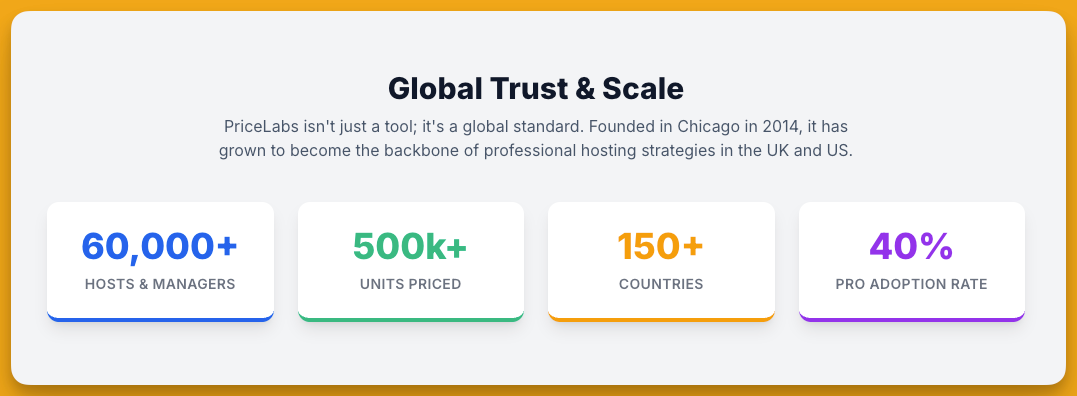
Dynamic pricing has become a cornerstone of success for short-term rental hosts and property managers, enabling them to maximize revenue by adjusting rates in real time. PriceLabs is a leading tool in this space – a dynamic pricing and revenue management platform used by Airbnb hosts, vacation rental managers, and even small hotels to optimize their pricing strategy[1]. Founded in 2014 and headquartered in Chicago, PriceLabs today is trusted by over 60,000 hosts and managers worldwide, pricing more than 500,000 units across 150+ countries[2]. Both the US and UK markets have widely embraced such tools, with surveys indicating that over 40% of professional hosts leverage AI-driven pricing to set optimal rates[3]. In both regions, achieving the right price for each night can significantly boost occupancy and profitability – and PriceLabs aims to do exactly that by providing data-driven pricing recommendations. This article offers an in-depth look at how PriceLabs works, its pros and cons, key considerations before adopting it, the platforms and property management systems it integrates with, and how it compares to similar tools like Wheelhouse and Beyond Pricing. The analysis is tailored to readers in the UK and US, noting any regional nuances in pricing or features.
How PriceLabs Works
PriceLabs’ Core Algorithm: At the heart of PriceLabs is a proprietary dynamic pricing algorithm called “Hyper Local Pulse” (HLP), which uses hyper-local market data and analytics to recommend optimal nightly rates[4]. PriceLabs essentially automates the complex task of rate-setting with a three-step process[5]:
- Market Data Collection: PriceLabs continuously gathers data from major booking platforms like Airbnb, Vrbo, and Booking.com to analyze market demand in the specific area of each listing[6]. It factors in seasonality, day-of-week trends, local events & holidays, booking lead times, and overall supply/demand (“pacing”) in the market[7]. This means the software knows, for example, if a big festival, bank holiday, or sports event is driving up demand in your city on certain dates, or if bookings are slow during off-season weeks, and it adjusts pricing recommendations accordingly.
- Listing Performance Analysis: PriceLabs also incorporates your property’s own historical performance and upcoming bookings into its calculations[8]. This personalized analysis allows the tool to adjust for how well your listing typically performs (e.g. its average occupancy, lead time, etc.) relative to the market. By blending market trends with your listing’s booking history, PriceLabs generates custom rate recommendations for each available night[8].
- Daily Price Updates & Sync: PriceLabs then applies the recommended prices to your listing’s calendar each day, syncing these updates to all connected booking channels or your Property Management System (PMS)[9]. Prices can be synced directly to platforms like Airbnb/Vrbo or via an integrated PMS/channel manager. This daily refresh ensures your rates remain up-to-date and responsive to the latest market conditions[10]. For example, if a competitor drops their price or a local event sells out causing a surge in lodging demand, PriceLabs’ next daily update will adjust your rates accordingly.
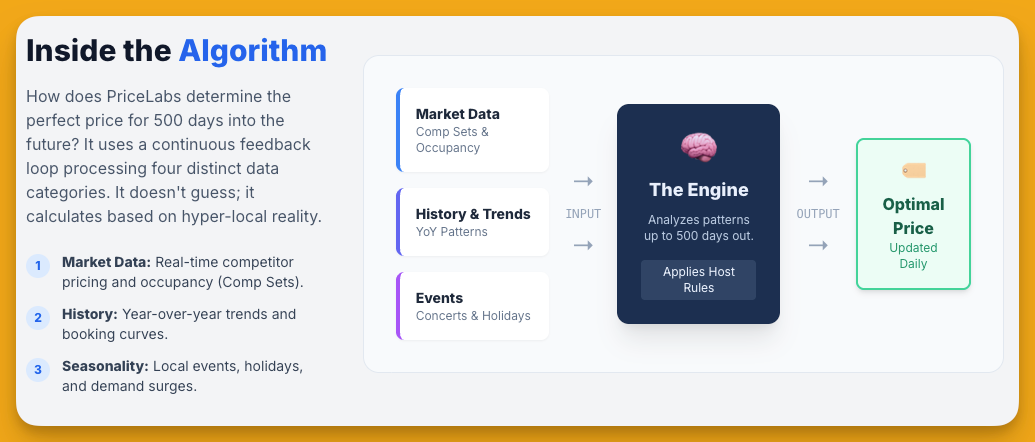
User Control and Customization: While PriceLabs automates pricing, hosts and managers retain significant control over strategy. Users set a Base Price for each listing – roughly an “average” nightly rate for a typical month – which serves as a starting point for the algorithm[11]. From there, PriceLabs’ algorithm will raise or lower nightly prices around that base based on demand signals (higher for peak dates, lower for slow dates). Importantly, you can also define a minimum price (to avoid ever pricing below your comfort level) and an optional maximum price[12]. In the UK and US, many hosts use this to ensure rates never dip below a certain threshold (e.g. to cover costs, especially given considerations like UK VAT or cleaning fees).
PriceLabs offers a rich suite of custom rule settings so you can fine-tune how pricing behaves[12]. You can set minimum stay lengths (and even different minimum stays for last-minute bookings vs far-future bookings), designate “orphan gap” rules (e.g. automatically discounting 1-night gaps between bookings), and apply occupancy-based adjustments (such as giving discounts when your occupancy for the next few weeks is low, or premium pricing when only a few units remain open)[12]. You can also create seasonal profiles for known high or low seasons, override prices on specific dates (e.g. manually set a high rate for New Year’s Eve if you choose), and more[12]. In short, the system allows as much or as little manual input as you prefer: hands-on users can customize dozens of parameters, whereas hands-off users can stick mostly to the algorithm’s suggestions with minimal tweaks[12].
Transparency and Monitoring: PriceLabs provides a pricing calendar view where you can see all upcoming dates with their recommended prices, along with a breakdown of why each price is what it is[13]. This helps users understand the impact of various factors (e.g. a note might indicate a last-minute discount or a special event boost for a given day). The platform also includes tools to track competitor rates and local market occupancy – you can monitor what nearby listings or hotels are charging and compare your occupancy to market averages[13]. These insights give context to the pricing recommendations and help users validate or adjust their strategy.
Beyond the dynamic pricing engine, PriceLabs offers additional modules:
– Portfolio Analytics: a free included feature that provides real-time performance metrics (occupancy, ADR, revenue, etc.) for your listings[14][15]. This is especially useful for property managers with multiple units, as it highlights which properties are underperforming or outperforming so you can adjust pricing or marketing accordingly. For example, you can compare each property’s revenue and occupancy to others in your portfolio or to market benchmarks[16].
– Market Dashboards: a market research tool (available at extra cost) that lets you analyze vacation rental data in any area, even if you don’t have listings there[17]. You can define a custom “comp set” or area and see competitor pricing, booking trends, and supply/demand stats. This is helpful for spotting trends or evaluating new markets (e.g. if you’re considering investing in a new city, the dashboard can show seasonality and rates in that locale).
– Revenue Estimator Pro: an advanced add-on that forecasts a property’s revenue potential by analyzing its location and market data[18]. This is used by investors or managers to predict what a new listing could earn before it’s listed, by factoring in local demand patterns and seasonality[19].
Example: Suppose you are an Airbnb host in London with a two-bedroom flat. You set a base price of £150/night and minimum of £100. PriceLabs might observe that next month has a major event (say Wimbledon finals) during which demand spikes. It will raise prices well above your base (perhaps to £250 for those nights) based on market data. For low-demand weekdays, it might suggest dropping to £120 to fill your calendar. If your property is suddenly 80% booked for the next 4 weeks, an occupancy rule might incrementally increase rates for the remaining nights. All these adjustments happen automatically each day, but you could always override or cap them if needed. In the US, a similar scenario might be an Airbnb in Austin during SXSW (high demand) versus a slow week in the hot summer – the system adapts prices to each situation.
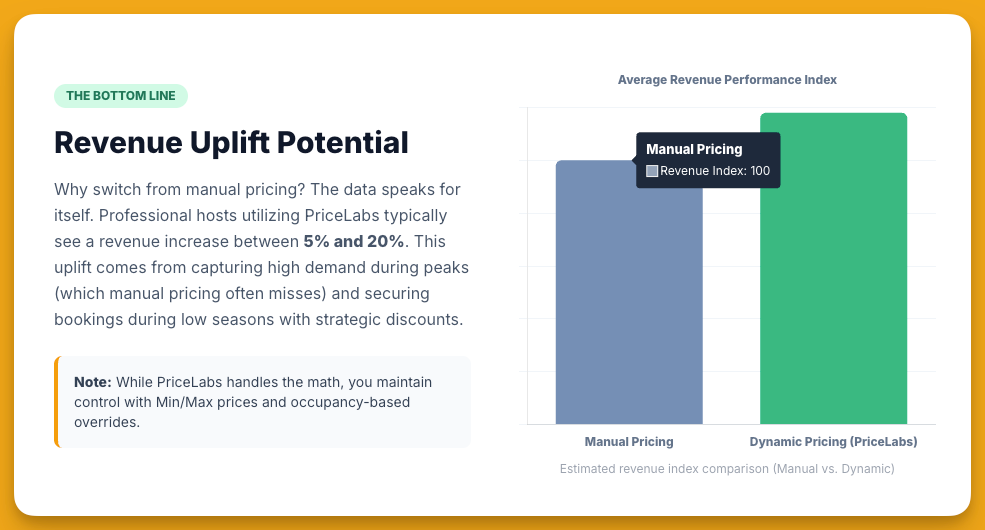
Overall, PriceLabs functions as an intelligent auto-pilot for pricing: it saves hosts the time of constant market research and repricing, while typically outperforming static rates or Airbnb’s own “Smart Pricing” in revenue. By addressing both major problems of manual pricing – setting incorrect rates and spending too much time on pricing – PriceLabs helps users increase revenue and efficiency[20].
Pros of PriceLabs
PriceLabs has several notable advantages that have made it popular among hosts and property managers in both the US and UK:
- Dynamic Pricing Increases Revenue and Occupancy: The primary benefit is optimized nightly rates that respond to real-time demand, which can significantly boost both occupancy and total income. By avoiding underpricing on high-demand dates and overpricing on low-demand dates, hosts capture more bookings and higher earnings[21]. Many users report substantial revenue uplifts after switching from manual pricing – for example, discovering they could charge far more on event weekends than they initially thought. One host noted that PriceLabs suggested rates (e.g. turning a “£300 night” into a “£800 night” during peak demand) that they “wouldn’t have had the nerve” to set on their own[22][23]. In short, the algorithm’s data-driven confidence can translate into real profit gains.
- Comprehensive Data Factors: PriceLabs’ algorithm considers multiple factors – from seasonality and holidays to local booking trends and comps – rather than simplistic rules[21]. This “hyper-local” approach ensures pricing is sensitive to nuances of each market and property. Because it pulls data from Airbnb, Vrbo, Booking.com and more, the recommendations reflect broader market demand (not just one platform’s data)[6]. Users also benefit from seeing competitor pricing and occupancy benchmarks, which provide context and help validate the strategy[13]. This breadth of data analysis is difficult to replicate manually, giving PriceLabs an edge in finding the optimal rate.
- High Level of Customization & Control: Despite being automated, PriceLabs is not a black box – hosts can fine-tune the pricing behavior extensively. The platform supports a wide array of custom pricing rules (minimum/maximum rates, last-minute discounts, orphan day adjustments, seasonality profiles, occupancy-based tweaks, etc.)[12]. This means you can adapt the system to your specific strategy or comfort level. For example, UK holiday let owners might set different minimum stays for peak summer vs off-season, or US urban apartment hosts might enforce higher prices for 1-night stays on weekends. The ability to override any suggested price or set manual rules gives users confidence and flexibility that their unique situations are accommodated. Many users find that these deep customization options pay back the effort of learning the tool, allowing them to achieve a pricing strategy that feels both intelligent and tailor-made[24].
- Broad Integration with Listing Platforms and PMS: PriceLabs seamlessly connects to the tools hosts already use. It can integrate directly with major booking channels like Airbnb, Vrbo, and Booking.com, and it supports 150+ property management systems (PMS) and channel managers for those who operate at scale[25]. This is a huge plus for efficiency – rates updated in PriceLabs will automatically sync to all your channels via your PMS or the direct API connections. No manual importing or exporting of rates is needed. Notably, PriceLabs works with both big-name and niche systems, from popular software like Guesty, Hostaway, Lodgify, and Smoobu to hotel PMS like Mews and StayNTouch[26][27]. (See Integrations section below for details.) This wide compatibility means most US/UK hosts can plug PriceLabs into their existing tech stack easily, whether they manage a single Airbnb or a multi-platform portfolio with a PMS.
- Portfolio Analytics & Market Insights: Unlike some pricing tools that focus solely on rates, PriceLabs includes analytics dashboards that give valuable insight into your business and market. The Portfolio Analytics (free with the subscription) offers real-time metrics on your listings’ performance – a big benefit for professional managers who need to track KPIs across properties[28]. The Market Dashboards (available as an add-on) provide competitive market data for any region you choose, helping identify trends or opportunities. For hosts in dynamic markets (e.g. London or New York) or those expanding to new locations, having these insights within the same platform is very convenient. It essentially combines some features of market research services (like AirDNA) with the pricing tool. This can guide smarter decisions – for instance, seeing local occupancy trends might prompt adjusting your minimum stay rules or detecting an upcoming event that justifies a price spike.
- Transparent, Flat-Fee Pricing (Cost Effective): PriceLabs uses a flat subscription pricing model rather than charging a commission on bookings (though a commission option exists, see Pricing section). This flat fee is often cited as a pro because it can save money for high-performing listings. Whether your listing earns $1,000 or $10,000 in a month, the cost of PriceLabs stays roughly the same. An industry expert noted that PriceLabs tends to be the cheapest option for hosts with high occupancy and decent rates, since competing tools that charge ~1% of booking revenue would scale up in cost as revenue grows[29]. PriceLabs’ base rate (~$19.99 per listing per month in the US/UK) also drops on a per-listing basis for larger portfolios (volume discounts). This makes it very appealing for professional property managers – a PM with 50 listings might pay roughly $6–7 per listing, for example, which is quite economical. By contrast, a commission-based tool taking 1% of revenue on 50 listings could far exceed that if each listing is generating significant bookings. In essence, PriceLabs’ pricing model offers predictability and potentially lower costs for many users[30]. (Note: PriceLabs offers a 30-day free trial as well, allowing hosts to test its benefits risk-free[31].)
- Active in Both US and UK Markets: PriceLabs is a global tool and its features apply equally in different regions. Both US and UK hosts benefit from the platform’s handling of local seasonality and events (e.g. it will adjust for US holidays like Thanksgiving or 4th of July just as readily as for UK events like Bank Holidays or major sporting events). The system natively supports multiple currencies and is available in several languages[32]. Importantly, the company has been expanding its data and user base in Europe and the UK, so even relatively remote local markets often have data coverage. Many UK property managers (from city apartment rentals to countryside holiday cottages) have adopted PriceLabs to stay competitive with fluctuating demand. The same core advantages – revenue lift, time savings, and data insight – have been observed by users on both sides of the Atlantic.
Cons of PriceLabs
Despite its strengths, PriceLabs also comes with some drawbacks and challenges that users should weigh:
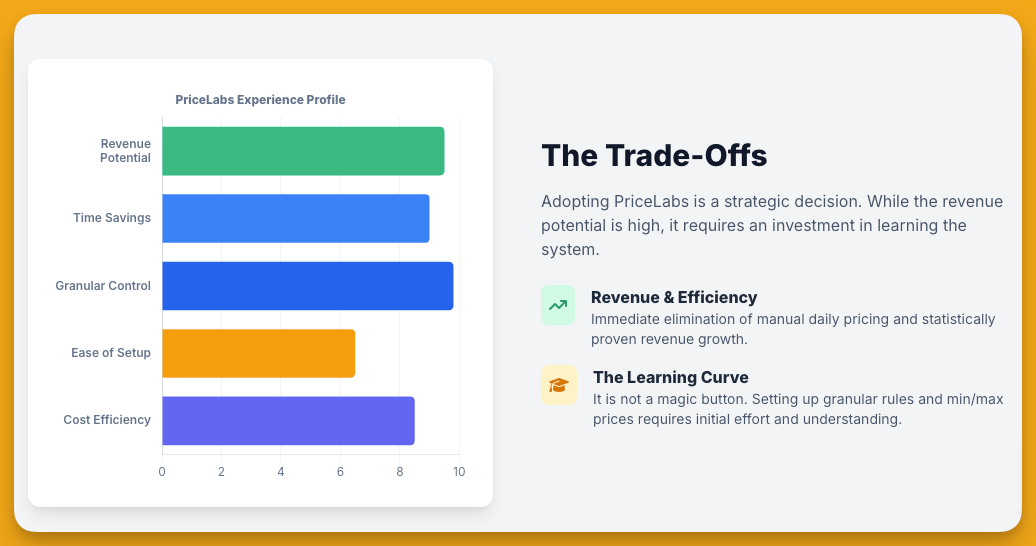
- Steep Learning Curve for New Users: Perhaps the most cited downside is that PriceLabs can feel overwhelming or unintuitive for beginners[33][34]. The dashboard is packed with graphs, settings, and data, which can be confusing if you’re not already familiar with revenue management concepts. New hosts might find the plethora of customization options daunting at first. Some users have noted the interface and graphs are not the most user-friendly or modern in design[35]. In the beginning, it takes time to understand how to set your base price correctly, how each rule works, and to trust the algorithm. This is a key difference from simpler tools (or Airbnb’s native pricing suggestions) – PriceLabs rewards those willing to invest a bit of time learning it. For less tech-savvy hosts or those seeking a plug-and-play solution, the initial complexity can be a hurdle.
- Occasional Data Glitches or Odd Recommendations: While generally reliable, PriceLabs is not infallible. There are reports of occasionally odd price suggestions or data inaccuracies that require host intervention[36]. For example, the algorithm might sometimes undershoot or overshoot if it misreads demand signals or if there’s anomalous data. Users have mentioned seeing an unrealistically low rate or high rate recommended for a date, prompting them to manually adjust. Such cases aren’t the norm, but they highlight the need for oversight – you shouldn’t accept all suggestions blindly. PriceLabs itself advises users to review the pricing calendar periodically. Additionally, being an automated tool, it might miss the context only a human knows: e.g., your property has a unique feature or a restriction that isn’t accounted for in market data. Thus, occasional manual tweaks are part of using the tool. (It’s worth noting that all dynamic pricing services share this con to some extent – none can be 100% perfect in forecasting demand.)
- Not a Complete Property Management Solution: PriceLabs focuses specifically on pricing and revenue management. Unlike some competitors (e.g., Beyond, which has ventured into offering channel management and a direct booking engine), PriceLabs does not handle bookings, guest communication, or other property management tasks[37]. Nor does it automate things like messaging or cleaning schedules, etc. It’s a specialized tool. This is only a “con” in the sense that if a host is looking for an all-in-one platform, PriceLabs would be just one component of their stack. You’ll likely still need a PMS or channel manager to handle operations – PriceLabs will integrate with it, but it won’t replace it. For most users this is expected, but it’s good to be aware that PriceLabs isn’t a channel manager or PMS; it addresses pricing only (plus the analytics add-ons).
- Pricing Complexity for Mixed Features: While the flat pricing model is straightforward for a single product, some users find that calculating the total cost can get confusing if you subscribe to multiple PriceLabs products or have many listings with add-ons[38]. For instance, Dynamic Pricing is charged per listing, Market Dashboards are charged per market, and Revenue Estimator by usage – if you use all of them, understanding your monthly bill might require a bit of arithmetic. The flexible “pay for what you use” structure is nice, but it isn’t as simple as a single flat fee for everything. Additionally, for hosts with only one or two listings that generate modest revenue, the flat fee may be less cost-effective than a commission model. If you only earn, say, $500 in bookings a month for a small cottage, paying ~$20 might feel steep compared to a 1% fee (which would be $5 on $500). In other words, PriceLabs’ value grows with scale – small hosts on tight margins might see this as a con. (That said, the 30-day free trial and ability to pause listings can mitigate costs if you only use it seasonally.)
- Limited Support Channels: PriceLabs primarily offers support via email and a knowledge base – there is no live phone support. Some users have complained about slow or unhelpful customer support responses in certain cases[39]. Others, however, have had positive experiences with email support being prompt[40], so this feedback is mixed. In the UK time zone, response might lag if the support team is US-based, though PriceLabs has a global user base and presumably support across regions. Regardless, the absence of real-time support (chat or phone) could be a drawback if you prefer hands-on guidance or have an urgent issue. The interface also doesn’t provide much in-app guidance beyond tooltips, so learning often relies on external tutorials or help articles. On the positive side, PriceLabs does offer webinars and training resources to help users get up to speed[41], which can alleviate the learning curve issue mentioned.
- Requires Active Management (Not “Set and Forget”): Despite being an automation tool, PriceLabs works best with regular user input and oversight. Hosts hoping for completely passive, hands-off income should note that dynamic pricing still requires strategy. You need to configure your base price and minimums appropriately, and adjust them if market conditions or your goals change. PriceLabs will do the daily number-crunching, but it doesn’t eliminate the need to manage your property and make strategic decisions[42]. For example, if your city suddenly enacts new rental regulations or a competitor drastically changes their rates, you should respond by updating your pricing settings – the tool won’t know to do that unless the market data reflects it over time. In short, PriceLabs is a powerful aid, not an autopilot that you can ignore completely. Failing to monitor it can carry risks (e.g., if your base price was set wrongly low, the system might consistently underprice you until you catch it).
- Potential for Pricing Volatility: By design, PriceLabs will vary your prices more dynamically than some other methods. Some hosts and guests can be surprised by how much rates fluctuate day-to-day (e.g. one night £120, next night £160, then back to £130, etc., based on demand). While this usually maximizes revenue, it can sometimes lead to very low prices for last-minute openings or very high prices for high-demand periods. If not managed, extremely low prices might attract undesirable bookings or affect your brand positioning, and extremely high prices (while great if booked) could also deter bookings if set beyond what the market will bear. It’s important to use the rule settings (minimum price, etc.) to keep the pricing within sensible bounds. This volatility isn’t necessarily a “con” – it’s often intentional to maximize yield[43] – but it requires a mindset shift for hosts used to flat pricing. You have to be comfortable seeing your nightly rate swing significantly and trust the process that over a season it yields better results. Some hosts who prefer steadier pricing might find this aspect uncomfortable.
Key Considerations and Risks Before Adopting PriceLabs
Before implementing PriceLabs, there are several key considerations and potential risks to be aware of:
- Setup: Base Price Calibration: Setting the correct base price is crucial as it anchors the entire pricing strategy. PriceLabs offers a “Base Price Help” tool with suggestions[11], but ultimately you should use your market knowledge (or data from the Market Dashboard) to pick a realistic base. If your base price is off (too high or too low), all the automated adjustments will pivot around a suboptimal figure. A common recommendation is to periodically re-evaluate your base price – for instance, revisit it every few months or when entering a new season, as booking patterns can change[11]. Especially in the UK, where seasonal demand between summer and winter can be very different for holiday lets, you may need to adjust the base to reflect those shifts.
- Initial Monitoring and Tuning: When you first activate PriceLabs, don’t treat it as a “set and forget” solution. Plan to monitor the suggested prices closely in the first few weeks. Check how your calendar looks, and compare against competitors or your own intuition. If something seems off (e.g. prices drop too low for a popular event you know of), you might need to add a custom adjustment or raise your minimum price. The risk of not monitoring is that you could end up with a handful of bookings at undesirable rates before you notice. Most hosts find that after an initial tuning period – adjusting base price, tweaking min/max, and seeing how the algorithm behaves in their market – they gain confidence and can step back to a lighter monitoring routine. But that initial phase is important to ensure the tool is aligned with your goals.
- Configure Safeguards: Always utilize the safeguard settings such as Minimum Price and Maximum Price (if relevant) to enforce your boundaries. For example, if you know you never want to accept less than $100 (£80) for a night (after cleaning fees, etc.), set that as your absolute floor. Similarly, if there’s a cap due to regulations or agreements (some condo buildings or landlords might have caps on nightly rates), use the max price setting. This prevents extreme cases and provides peace of mind that the algorithm won’t inadvertently violate your limits[12]. Another safeguard is the minimum and maximum stay rules – ensure these are in place to avoid undesirable bookings (e.g. a one-night stay on a Friday that leaves a hard-to-fill gap, if that’s a concern; PriceLabs can enforce a 2-night weekend minimum if you tell it to).
- Understand Pricing Model and Fees: In the UK and EU, remember that VAT or taxes may apply on the PriceLabs subscription fee. The listed prices (e.g. $19.99 per listing) are typically exclusive of tax[44]. UK users will likely be charged VAT on top of the subscription, so factor that ~20% in when calculating your costs. Additionally, be aware of the billing structure: PriceLabs charges at the end of each month based on your number of synced listings and their location (pricing tiers differ slightly for listings in “USA/UK/Europe” vs. other regions)[45]. For example, one listing in the UK or US is ~$19.99/month; if you add a second listing, the price per listing may reduce for the additional one. Use the pricing calculator provided to estimate your fees, especially if you manage a large portfolio.
- Mapping Listings to Save Costs: If you list the same property on multiple channels (say Airbnb and Vrbo), PriceLabs allows you to “map” those to one parent listing so that you’re not charged twice for the same unit’s pricing updates. Mapped duplicate listings cost only $1 extra per month[46]. Similarly, if you have multiple identical units (like 3 units in one building) that you price the same, you can map them as a multi-unit and pay a small add-on instead of full price for each. Take advantage of these features to keep your subscription cost-efficient.
- Integration Choice: If you use a PMS or channel manager, it’s generally advisable to integrate PriceLabs with the PMS, not directly with Airbnb (assuming the PMS will distribute the prices to Airbnb/Booking.com etc.). This way, the PMS remains the central source of truth for rates. PriceLabs has direct Airbnb integration, but that is meant for hosts not using any PMS. If you adopt a PMS later, you’d have to rewire the connection. So choose the integration path that fits your setup – for most multi-platform property managers, connect PriceLabs to your PMS. Ensure your particular PMS is supported (the vast majority are – see next section) and follow the provided setup guides for a smooth connection.
- Periodic Review of Performance: A risk in any automated system is complacency. It’s wise to regularly review how PriceLabs is impacting your business. Use the Portfolio Analytics to spot if revenue is truly up, or if perhaps occupancy climbed but ADR fell (or vice versa) and whether that meets your goals. Some hosts may find they want to tweak strategy – e.g., if you value occupancy over rate (perhaps to boost your Airbnb search ranking with more stays), you might set more aggressive last-minute discounts; if you value maximizing rate (even at some cost to occupancy), you might raise your minimum price or reduce discounts. PriceLabs gives the tools to do either, but it’s your job to decide your strategy. Every few months, check those strategy settings. This ensures the tool continues to align with your business objectives (which might evolve, say, with market changes or if you acquire more properties).
- Stay Informed on Market Events: While PriceLabs will catch many events and trends, extremely local or niche events might not significantly move the algorithm if data is scarce. If your town has a once-a-year festival that isn’t on the radar of many bookers yet (or say a big wedding party inquiry that fills many local rentals at once), it could be useful to manually adjust prices or minimum stays for those dates. In the US and UK, most major holidays and events (e.g. Edinburgh Fringe Festival, Super Bowl, Glastonbury, London New Year’s Eve fireworks, etc.) will be factored in because they cause noticeable booking demand changes. But you, as a host, should still keep an eye on local news (new conferences, concerts, etc.) – if you suspect something will drive bookings and PriceLabs hasn’t reacted, you can use a custom override to capitalize on it. Conversely, in extraordinary events like sudden travel lockdowns or market shocks, be ready to adjust as well (e.g. in early COVID, dynamic tools had to be manually reigned in or recalibrated since historical data became less relevant).
- Comparative Testing: If uncertain, consider running a side-by-side test of PriceLabs on one property while keeping another similar property on your old pricing method or a competitor’s tool (if feasible). Some experienced hosts have done head-to-head comparisons of PriceLabs, Beyond, and Wheelhouse on similar listings to gauge revenue differences[47]. In one such test, Beyond Pricing yielded slightly higher revenue, but once the different fee structures were accounted for, PriceLabs had the best net revenue for the host[30]. Results can vary by market, so it’s insightful to see how PriceLabs performs in your specific scenario. Just ensure you run the test fairly (same base setup, similar properties) and give it enough time (a few months, ideally) to account for booking cycles.
In summary, the key to success with PriceLabs is active engagement, especially early on. The risks of automated pricing – like potential mispricing – are mitigated by thoughtful configuration and ongoing awareness. Most users who take the time to set it up properly and check in periodically find the rewards (higher revenue, less manual work) far outweigh the downsides. But it’s not a “magic wand” – it’s a sophisticated tool that works best in the hands of an informed host.
Platform Integrations and PMS Compatibility
One of PriceLabs’ strengths is its extensive integration ecosystem, making it convenient for hosts and managers to implement without changing their existing workflows. PriceLabs can connect to over 150 different platforms to import listings and push price updates[25]. These integrations fall into two main categories:
- Direct Booking Channels: PriceLabs integrates directly with major Online Travel Agencies (OTAs) and booking platforms. Currently, you can link accounts from Airbnb, Booking.com, Vrbo, and Houfy directly to PriceLabs[48]. This is ideal for individual hosts who primarily use one platform (or a couple of them) and want to feed pricing recommendations straight into those listings. For example, a UK host with only Airbnb listings can connect Airbnb to PriceLabs, and PriceLabs will update prices on Airbnb automatically each day. The direct integrations cover the big global channels; note that TripAdvisor or Expedia are not direct options, but those are typically accessed via channel managers which PriceLabs can integrate with (see below).
- Property Management Systems (PMS) and Channel Managers: PriceLabs offers native integrations with a vast array of PMS and channel management software used in the short-term rental and hospitality industry. This is especially useful for property managers who list on multiple channels or manage many units. By connecting PriceLabs to your PMS, you allow it to update the PMS’s rates, which in turn sync to all your connected channels (ensuring consistent pricing everywhere). The list of supported systems is long and continuously growing – at last count, PriceLabs could connect with 150+ PMS/channel manager platforms[25]. These include widely-used vacation rental management systems as well as regional and niche software.
Some examples of popular PMS/Channel Managers that PriceLabs integrates with are: Guesty (and Guesty for Hosts), Hostaway, Hostfully, Hospitable (formerly Smartbnb), iGMS, Kigo, Lodgify, Beds24, Cloudbeds, Escapia, eviivo, OwnerRez, Rentals United, Smoobu, Tokeet, Uplisting, Your.Rentals, and many more[26][27]. It also supports hotel-focused systems like Mews, MiniHotel, RMS Cloud, StayNTouch, etc., which means even small hotels or aparthotels can use PriceLabs for revenue management[49][50]. (For instance, a boutique hotel in London using Mews PMS could leverage PriceLabs to dynamically price its rooms, just as a vacation rental owner would for an Airbnb listing.)
To illustrate the breadth: a US-based vacation rental manager using Track PMS or Barefoot can plug PriceLabs in; a UK property manager on SuperControl (common for UK holiday cottages) or Eviivo can do likewise – these are all in PriceLabs’ integration roster[51][52]. Even less common or regional tools (from Avantio in Europe to Ciirus or Elina PMS) are supported[53][54]. This extensive coverage means most hosts won’t need to change their software to use PriceLabs – you simply connect it to what you already use. The integration process usually involves generating an API key or login credentials from your PMS for PriceLabs to use, and then selecting which listings to import.
It’s worth noting that some property management systems have adopted PriceLabs’ API internally rather than via user-side integration. For example, certain PMS platforms have “built-in” dynamic pricing powered by PriceLabs (using its API)[55]. In such cases, you might see PriceLabs functionalities within your PMS directly. However, the general approach for most is to connect via the integrations menu in PriceLabs.
Integration Best Practices: Once integrated, you manage most pricing settings in PriceLabs, and it will continuously push rates to the connected platform. It’s important to disable any other pricing automation on the PMS or channel to avoid conflicts (e.g., turn off Airbnb’s Smart Pricing if you’re using PriceLabs to drive Airbnb rates). Also, verify whether the integration covers not just nightly price but also minimum stay and other fields – many integrations do allow PriceLabs to set minimum stay rules, check-in restrictions, etc., but a few might be price-only. The PriceLabs help center has a page showing which features work with which integration, so you can check if, for example, your PMS supports last-minute discounts from PriceLabs or not[56].
In summary, PriceLabs integration capabilities are a major convenience factor. Whether you’re an individual Airbnb host or a large property manager with a complex tech stack, PriceLabs likely can plug in with minimal fuss. This is equally true in the US and UK markets – the big players in both regions (Airbnb, Booking.com, as well as top PMS vendors) are all supported. The ability to “set it and let it run” via integration means once you’ve configured PriceLabs, the daily rate updates happen automatically in the background, with no need for manual imports or spreadsheet uploads. This tight integration, combined with the mapping feature (to avoid double charges for multi-channel listings), streamlines the workflow for hosts and ensures consistency across all booking platforms[57] – a new price is reflected on Airbnb, Vrbo, your direct booking site, etc., without any extra effort.
(For a full list of integrations, PriceLabs provides documentation – but the partial list above highlights that virtually all major PMS and channel managers (Guesty, Hostaway, Lodgify, Smoobu, Cloudbeds, etc.) and direct channels (Airbnb, Vrbo, Booking.com) are covered[26][27].)
PriceLabs vs. Beyond Pricing (Beyond)
Beyond (formerly known as Beyond Pricing) is one of PriceLabs’ closest competitors, and while both tools serve the same fundamental purpose (dynamic pricing for rentals), there are some distinct differences in their models and features, as well as considerations for different user profiles:
- Pricing Model: The most immediately noticeable difference is how you pay for the service. Beyond uses a pure commission-based pricing model, whereas PriceLabs offers a flat-rate model (with an optional percentage alternative). Beyond’s standard plans charge a percentage of your booking revenue as the fee – typically 1% of bookings on the “Growth” plan, 1.25% on “Pro”, up to 1.5% on the top “Guidance” plan[58]. There is no flat monthly cap with Beyond; the more your listing earns, the more you pay them. PriceLabs, in contrast, charges a fixed fee per listing (roughly $19.99/month in US/UK for one listing, with volume discounts) and does not take a cut of your revenue[59]. This means for high-grossing properties, PriceLabs can be significantly cheaper, whereas for a low-earning property (or new host), Beyond’s 1% fee might initially be less than a $20 flat fee. In essence, Beyond aligns its cost with your revenue, while PriceLabs is a predictable subscription. Users in the US and UK with large portfolios or high nightly rates often favor PriceLabs for cost certainty; those just starting with a single listing might appreciate Beyond’s pay-as-you-earn approach. (It’s worth noting PriceLabs does have a 1% commission option too, but its primary model that it advertises is flat-rate[59].)
- Feature Set and Scope: Beyond began as a dynamic pricing tool but has evolved into a more comprehensive revenue management platform. In addition to pricing, Beyond offers features like a simple channel manager, booking site templates, and other tools beyond pure pricing[37]. For example, Beyond can help hosts build a direct booking website and manage some distribution, which PriceLabs does not do. This makes Beyond somewhat of a broader solution for property managers who want an integrated toolkit. PriceLabs, meanwhile, has largely kept its focus on pricing (with ancillary analytics products). Both PriceLabs and Beyond provide similar dynamic pricing capabilities – analyzing seasonality, holidays, local demand, etc., and both allow customization like min/base rates, stay restrictions, and overrides[60]. So in terms of pricing power, they are comparable. But if you are a host looking for a one-stop-shop that can also handle things like distribution or marketing, Beyond’s expanded offerings might sway you. On the other hand, many full-time hosts already have a PMS or channel manager they like, so PriceLabs’ narrower focus (and integration into those existing systems) is perfectly sufficient.
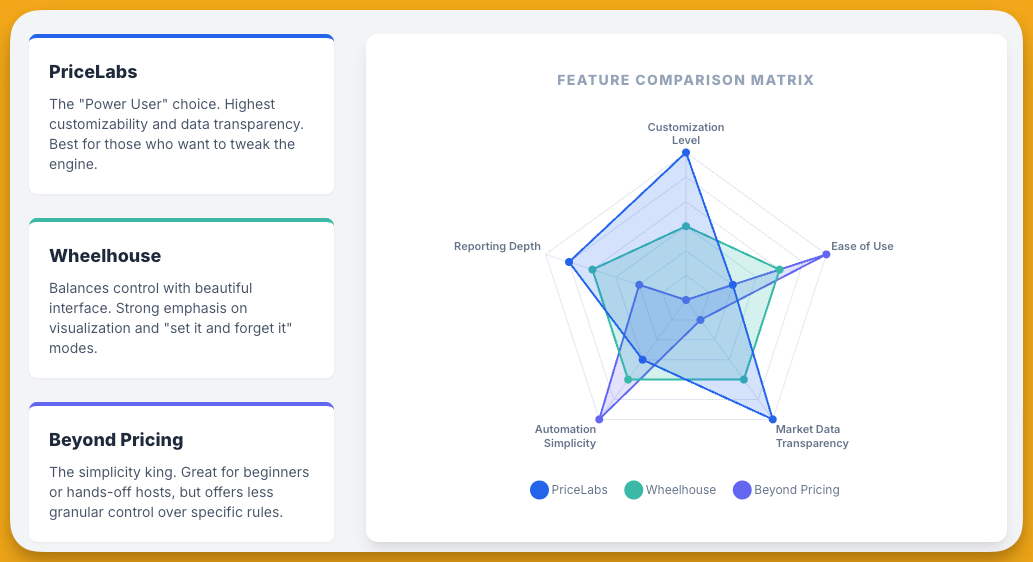
- Ease of Use: Beyond is often regarded as a bit more straightforward or “beginner-friendly” in its interface and approach. Users have noted that Beyond’s tools can be simpler to navigate, which might benefit those who want decent results without too much complexity[61]. PriceLabs, as discussed, can be more complex but also offers more granular control. Therefore, ideal user profiles differ slightly: Beyond can be a great choice for a casual Airbnb host or a small property manager who wants to “set it and largely forget it,” relying on Beyond’s algorithm with minimal tinkering. PriceLabs might better suit power-users – those who enjoy tweaking settings, analyzing metrics, and customizing strategy. That said, both platforms serve both individual hosts and professional managers; it’s more about personal preference in management style. Notably, Beyond’s tiered plans (Growth vs Pro vs Guidance) indicate that more advanced features (like certain analytics or guidance services) unlock at higher commission levels[58]. PriceLabs, by contrast, includes full customization to all users and its Portfolio Analytics free for all; there’s no “premium tier” of dynamic pricing – every subscriber has the same feature set, which some might view as more democratic.
- Performance and Strategy: In terms of pure revenue optimization, comparing Beyond and PriceLabs often reveals similar pricing recommendations for many markets, as both are using sophisticated algorithms on similar data. One host’s experiment found Beyond’s pricing edged out in revenue by a tiny margin but when factoring Beyond’s higher cost (commission), PriceLabs yielded better net revenue[30]. This is one anecdote; experiences vary. Both tools allow you to set whether you want to be aggressive or conservative (via base price adjustments, etc.). One specific difference: Beyond has a concept of “booking pacing” adjustments and might automatically lower prices if your place isn’t booking as quickly as the market, or raise if it’s booking too quickly, etc., which PriceLabs also does to an extent through occupancy rules. These nuances are hard to generalize; some users might find Beyond’s suggestions suit their market slightly better, others prefer PriceLabs. The key difference is not usually in algorithmic intelligence (both are competent), but in the surrounding ecosystem and cost.
- Region and Scale: Both Beyond and PriceLabs operate in the US, UK, and globally, so regional coverage isn’t a problem for either. Beyond, being a US-based company, initially gained a lot of traction in North America but it has many clients in Europe/UK now too. If anything, one might consider support availability or community presence – PriceLabs has a strong user community and often comes up in discussions among UK and European hosts as a recommended tool, whereas Beyond is equally recognized. For a UK-specific angle: some UK agencies might prefer Beyond if they are attracted to the idea of an all-in-one platform (since UK market often values direct booking channels to avoid Airbnb fees; Beyond offering a direct booking site could be a plus). However, those already using a PMS like Guesty or Avantio in the UK would find PriceLabs integration seamless and might not need Beyond’s extras.
Summary: PriceLabs vs Beyond can be boiled down to flat fee + highly customizable vs commission + slightly more plug-and-play. A small US Airbnb host who wants simplicity and doesn’t mind a revenue share might lean Beyond. A large UK property manager with 50 units, keen on minimizing costs and fine-tuning each property’s strategy, might lean PriceLabs. Beyond’s added services give it a broader scope, but also one could argue it’s trying to do more things (which you may or may not need). Importantly, a host can switch between them relatively easily if one doesn’t meet expectations – both have no long-term contracts (Beyond is pay-as-you-go per booking, PriceLabs month-to-month). Many seasoned hosts actually try both at different times.
PriceLabs vs. Wheelhouse
Wheelhouse is another prominent dynamic pricing platform often compared with PriceLabs. It’s known for its user-friendly design and strong data analytics. Here’s how Wheelhouse differs from PriceLabs in key aspects and which users might prefer one over the other:
- Pricing Model: Wheelhouse provides a flexible pricing scheme that, like PriceLabs, lets you choose between a flat fee or a commission. Wheelhouse’s “Pro Flex” plan charges 1% of booking revenue (with a minimum of $2.99 per month per listing)[62]. Alternatively, its “Pro Flat” plan is $19.99 per listing per month – very similar to PriceLabs’ base price – and Wheelhouse offers tiered discounts on that flat rate as your listing count grows (around 15% off for 10+ listings, 30% off for 50+ listings, and custom pricing beyond 100 listings)[63]. They even have a free basic plan for one listing with limited features, which can be appealing to new hosts who want to test the waters[64][65]. In comparison, PriceLabs has no permanent free tier (just the 30-day trial), and its volume discounts are built-in via the sliding scale. Both Wheelhouse and PriceLabs therefore can be very cost-effective for multiple properties (due to discounts) and give an owner the choice of paying a percentage vs flat. A notable difference: Wheelhouse imposes a small minimum fee on the 1% plan ($2.99), but in practice that’s inconsequential unless you truly earn close to nothing in a month. For a typical scenario, Wheelhouse and PriceLabs costs will be in the same ballpark, and generally lower than Beyond for those who prefer flat rates. UK hosts paying in GBP would just see the equivalent (Wheelhouse likely charges in USD as well, so currency conversion applies similarly as with PriceLabs).
- User Interface and Ease of Use: Wheelhouse is often praised for its modern, user-friendly interface that simplifies the complexities of dynamic pricing[66]. It tends to present data in visually clear ways and is considered accessible for those new to revenue management. Wheelhouse also provides educational content and guidance within the app – for instance, it offers suggested “strategy profiles.” This contrasts with PriceLabs, whose interface is functional but less guided. Therefore, for users who value ease-of-use and a shorter learning curve, Wheelhouse has an edge. It’s sometimes recommended to first-time dynamic pricing users who might be intimidated by PriceLabs. That said, PriceLabs is not overly difficult once learned; it just has more dense information on screen. Wheelhouse’s design philosophy is about making the complex more approachable, with features like tooltips explaining recommendations and a more graphical comp set analysis.
- Pricing Strategy Features: A unique aspect of Wheelhouse is that it offers multiple pricing strategy modes: you can choose a data-driven approach, a rule-based approach, or a hybrid of the two[67]. This means Wheelhouse allows hosts to lean more on pure algorithm (data-driven) or impose more of their own rules (rule-based), or combine them. For example, a rule-based strategy might be “I always want to drop prices by X% for last-minute vacancies” while data-driven might let the algorithm decide that drop based on market trends – Wheelhouse lets you do both or either. This is fairly unique; PriceLabs also has rules but they’re all user-defined overlays on the algorithm, whereas Wheelhouse conceptually separates the two if desired. Wheelhouse also has a “Comp Sets” feature, where you can select specific competitor listings to track closely, and a “Market Insights” dashboard that is somewhat analogous to PriceLabs’ Market Dashboard (though Wheelhouse’s is integrated into the main product and included for paying users)[68]. Both platforms let you customize many of the same factors (base price, minimums, seasonal adjustments, etc.), but Wheelhouse’s approach may resonate with those who want a bit more guided customization. For instance, Wheelhouse might have toggles or presets for certain common strategies, whereas PriceLabs expects the user to configure each rule.
- Analytics and Reporting: PriceLabs and Wheelhouse both offer analytics, but with different focus. PriceLabs’ Portfolio Analytics is robust for internal performance tracking (free for subscribers), whereas Wheelhouse emphasizes competitive insights (e.g., the comp set comparisons and a feature called “Wheelhouse Pulse” that gives market trends). In practice, both give you tools to gauge your performance and market position, but PriceLabs might give you more granular metrics on your own portfolio (since that’s a dedicated module) and Wheelhouse gives nicely packaged competitor analysis. Users managing dozens of listings might appreciate PriceLabs’ portfolio view to quickly identify underperformers[16], while those with a few properties might love Wheelhouse’s easy comp tracking to ensure they aren’t missing where they stand relative to neighbors.
- Ideal User Profiles: According to analyses, PriceLabs is often favored by highly analytical users and professional managers who want maximal control and integration flexibility[69]. If you are the type of manager who geeks out on data and wants to fine-tune every dial, PriceLabs will let you do that. It’s also a strong choice if you require an integration with a specific PMS – given its 150+ integrations, PriceLabs might support a system that Wheelhouse doesn’t (Wheelhouse also integrates with many PMS, but their integration list is a bit smaller). Wheelhouse, on the other hand, appeals to users who value a balance of automation with guidance[70]. New hosts or those unfamiliar with revenue management can benefit from Wheelhouse’s user-friendly design; it “feels” a bit more like a polished software product, whereas PriceLabs can feel like a very powerful, slightly utilitarian tool. Wheelhouse is also good for hosts who are very competitor-focused – the comp set feature allows direct benchmarking against chosen properties, which can be useful in highly competitive urban markets. Both tools are suitable for single-listing hosts up to enterprise managers, but Wheelhouse explicitly markets a free or low-cost entry point (good for a single rental owner), while PriceLabs shines as you scale up portfolios with its pricing and analytics.
- No Free Trial for Wheelhouse vs 30-day Trial for PriceLabs: One minor difference in approach – Wheelhouse does not offer a time-bound free trial, but as mentioned they have a free tier (with limited functionality, possibly limited to one listing). PriceLabs offers a full-featured 30-day free trial for any new user/listing[31]. In practice, you can try both without payment if you use Wheelhouse’s free listing option and PriceLabs’ trial on one listing. This is helpful if you’re undecided – you could run one on each and compare.
In sum, PriceLabs vs Wheelhouse often comes down to preferences in usability vs depth, and cost differences are negligible for most (both can be flat $20ish monthly, with PriceLabs potentially cheaper at large scales). A tech-savvy property manager in the US who wants to integrate with their custom PMS and dive deep into pricing analytics might choose PriceLabs. A part-time host in the UK who wants a sleek interface and maybe just one tool to check for pricing and market tips might lean toward Wheelhouse. Neither choice is wrong – both will likely improve your revenue over not using dynamic pricing – but they cater to slightly different mindsets. Many users actually praise Wheelhouse’s interface and support (they are known to be responsive, though smaller than PriceLabs in user base), whereas PriceLabs gets kudos for raw capabilities and continuous improvement (they frequently roll out new customization features).
It’s also worth noting that customer reviews for both are very strong (4.8–4.9/5 on average on Capterra/GetApp, etc.)[71][72], so the market views both positively. It truly is a matter of which fits your style and perhaps which integrates best with your other systems. If possible, a UK or US host should consider the specific features: e.g., do you need a comp set feature (Wheelhouse) or do you prefer free portfolio analytics (PriceLabs)? Are you okay with a purely web-based app (both are web apps; PriceLabs has no mobile app, and Wheelhouse doesn’t either as far as known, which is a minor equal drawback)? These granular points aside, both are solid – but PriceLabs might be called the more “power user” tool vs Wheelhouse the “user-friendly” tool, in summary[73][34].
Regional Differences: UK vs US Considerations
PriceLabs as a platform functions similarly across regions – the core algorithm and features are the same whether you’re pricing a London flat or a Los Angeles condo. However, there are a few regional considerations to note for UK vs US users:
- Pricing Currency and Taxes: PriceLabs will display and update prices in the currency of your listing or PMS. A UK host listing on Airbnb in GBP will see recommendations in GBP, whereas a US host will see USD, etc. The algorithm’s logic doesn’t change, just the currency symbol. On the billing side, as mentioned, UK/EU users should account for VAT on the subscription. Also, PriceLabs’ tiered pricing groups the UK with the US, Canada, Europe, etc., as higher income markets – meaning the flat fee for UK listings is the same as US listings (roughly $19.99 for one listing)[44]. In some other parts of the world, PriceLabs offers slightly lower fees, recognizing lower average rental rates in those regions. So UK and US are on equal footing in terms of subscription cost structure (and both are at the standard rate, not discounted region).
- Market Data Depth: Generally, urban markets and vacation hotspots in both the US and UK have strong data coverage in PriceLabs. For instance, cities like London, Edinburgh, New York, Los Angeles, etc., will have rich datasets fueling the algorithm. The Hyper Local Pulse model will incorporate local UK events (e.g., the FA Cup Final, Wimbledon, Edinburgh Festival) into pricing because those events cause measurable changes in booking data that PriceLabs captures. The same goes for US events (e.g., Coachella in California, Mardi Gras in New Orleans). In very small UK towns or rural areas, dynamic pricing tools might have slightly less finely tuned data simply due to fewer listings and bookings to learn from. However, PriceLabs mitigates this by pulling wider regional data if needed (hyper-local can scale up to local, regional trends when hyper-local info is sparse). UK hosts in less dense markets should still find the tool useful, but they might want to keep an eye on unique local demand drivers that a globally focused tool could miss (as noted earlier, manual awareness of events is wise).
- Integrations Popular by Region: Both UK and US property managers use PriceLabs, but the software they integrate it with can differ. In the US, integrations with systems like Track, VRM (Virtual Resort Manager), Escapia, Streamline, Guesty, Hostfully are common (many of these PMS are US-centric)[74][75]. In the UK/Europe, we see integrations with SuperControl, Avantio, Bookingsync (Smily), eviivo, Icnea, etc. (which are more Europe-oriented systems)[50][76]. The good news is PriceLabs supports both sets, reflecting its global approach. If you operate in the UK and use a local PMS like Staycation Holidays or Res:Harmonics (just as examples), it’s likely in the integration list. Similarly, US managers on systems like Barefoot, LiveRez, or OwnerRez will find those are supported too[27]. Region-specific nuances, such as UK holiday parks software or US-specific MLS vacation rental systems, are generally covered. The key consideration is simply to check the list (which is readily available) if you have a non-mainstream PMS. But as of 2025, it’s rare to find a notable PMS that isn’t integrated.
- Regulatory Context: One indirect regional factor is how dynamic pricing fits into the regulatory or competitive landscape. In some US cities (e.g., certain jurisdictions in New York or California), there may be restrictions on short-term rentals which limit booking windows or require minimum stays. PriceLabs can handle minimum stay rules but if your city only allows 90 nights of bookings a year (like some London boroughs have 90-day rules, or some U.S. cities have primary residence rules), then maximizing revenue within those constraints might be your goal. PriceLabs will help charge the best price for those nights you can operate. In saturated urban markets (both London and cities like NYC or LA), dynamic pricing is practically a must-have given fierce competition; in more steady markets (say a seaside town with consistent summer tourism), PriceLabs will still optimize but the swings might be less dramatic. UK hosts should remember to still comply with things like the Airbnb 90-day rule in London – PriceLabs might continue pricing beyond that threshold, so the host must block dates as needed to obey local laws (the tool doesn’t handle legal restrictions).
- Support and Community: PriceLabs has a global team, but users have noted that sometimes webinars or support sessions are on US time. However, they do offer webinars in multiple time zones and languages[41]. The user community (forums, Facebook groups, etc.) for PriceLabs includes many US and UK hosts sharing tips. It might be easier to find region-specific advice from peers – e.g., a UK host might share their settings for managing around European booking patterns (which can differ, such as Europeans booking vacations further in advance on average than Americans). These insights can help you tailor the tool to regional traveler behaviors. For instance, UK holiday lets might get booked many months in advance for summer weeks – PriceLabs’ default “far future pricing” settings might need adjusting (you might not want to raise prices too much far out if UK guests tend to book early). Recognizing such regional booking habits and configuring the tool accordingly can yield the best results.
In a nutshell, PriceLabs doesn’t fundamentally change between the US and UK, but hosts should apply local knowledge in using it. Both markets see substantial benefit from dynamic pricing, and PriceLabs has proven effective in increasing revenue in each. Regional differences are more about context (currency, events, integration choices) than the software itself. UK and US hosts alike should focus on mastering the tool and aligning it with their market’s rhythm – whether it’s ski season in Colorado or festival season in Edinburgh – PriceLabs can handle it with the right setup.
Conclusion
PriceLabs stands out as a powerful, feature-rich dynamic pricing and revenue management tool that has earned its popularity among Airbnb hosts, vacation rental managers, and boutique hotel operators in both the US and the UK. By leveraging data-driven algorithms and automations, it tackles the crucial task of nightly pricing in a way that aims to maximize revenue and occupancy while saving hosts countless hours of manual work. An in-depth look at the platform shows that it excels in customizability, integrations, and analytical insights, giving users the ability to fine-tune pricing strategies to their specific needs. Its major pros – like multi-factor rate optimization, broad PMS compatibility, and flexible pricing model – make it a compelling choice for professionals with large portfolios as well as serious individual hosts. On the flip side, one must consider the learning curve and the need for ongoing oversight as the trade-off for using such a robust system. The potential for occasional mispricing or confusion means it isn’t a fire-and-forget solution, especially at the start.
When compared to alternatives like Beyond and Wheelhouse, PriceLabs holds its own: it often offers the best value for money (especially at scale) due to its flat pricing and has deep capabilities for those who want control[47][34]. Beyond might suit those desiring an all-in-one solution with simpler onboarding, while Wheelhouse appeals to those who want slick design and guided strategy – yet, PriceLabs frequently outperforms on sheer customization and cost transparency. The right choice ultimately depends on the host’s profile and preferences, but many seasoned operators end up preferring PriceLabs for the long-term revenue uplift and flexibility it provides.
For hosts and managers in the UK and US, adopting PriceLabs (or any dynamic pricing tool) has increasingly become a competitive necessity in the short-term rental space. The markets are mature and dynamic – events, seasonality, and changing travel trends constantly push optimal prices up or down. Utilizing a platform like PriceLabs allows one to stay ahead of these shifts in both markets, whether it’s adjusting for a sudden surge of domestic travel in the US or the ebb and flow of international tourism in the UK. Of course, it’s vital to approach it with the right mindset: invest time to learn the system, keep an eye on local nuances, and use your own judgment in tandem with the algorithm. With that approach, PriceLabs can be a game-changer for your revenue strategy, transforming pricing from a tedious guessing game into a strategic advantage backed by data.
In summary, PriceLabs offers a sophisticated yet affordable solution for dynamic pricing, and when implemented thoughtfully, it can significantly increase earnings and efficiency for Airbnb hosts and property managers. It’s not without its challenges – primarily in mastering the tool and maintaining involvement – but the potential rewards in higher nightly rates and improved occupancy have been well documented[21][22]. As the UK and US vacation rental markets continue to evolve, tools like PriceLabs empower even small operators with enterprise-level revenue management techniques[77], helping level the playing field and driving success in an increasingly data-driven hospitality industry. With a 30-day free trial available and no long-term contracts, the risk to give it a try is low – and as many hosts have discovered, the upside can be substantial.
[1] [2] [25] [32] PriceLabs Pricing, Cost & Reviews – Capterra UK 2025
https://www.capterra.co.uk/software/158348/pricelabs
[3] What is Pricelabs | Taking Your Vacation Rental Business to the Next Level with Pricelabs – The Leading All-In-One Vacation rental management software for Pros – Hostaway
https://www.hostaway.com/blog/what-is-pricelabs/
[4] [5] [6] [7] [8] [9] [10] [12] [13] [14] [15] [16] [17] [18] [19] [20] [21] [26] [27] [28] [31] [33] [35] [36] [37] [38] [39] [42] [53] [58] [60] [61] [67] [77] PriceLabs Airbnb Pricing Software Review: Is Pricelabs Worth It?
https://www.gosummer.com/post/pricelabs-review
[11] [24] [29] [40] [43] Brutally Honest PriceLabs Review | Airbnb Smart Pricing
https://optimizemyairbnb.com/pricelabs-review-airbnb-smart-pricing/
[22] [23] [30] [47] [57] Is Pricelabs worth it? : r/airbnb_hosts
https://www.reddit.com/r/airbnb_hosts/comments/t13f5i/is_pricelabs_worth_it/
[34] [59] [62] [63] [64] [65] [66] [68] [69] [70] [71] [72] [73] PriceLabs vs Wheelhouse: Detailed Comparison | Mashvisor
https://www.mashvisor.com/blog/pricelabs-vs-wheelhouse/
[41] [48] [49] [50] [51] [52] [54] [55] [56] [74] [75] [76] List of systems with connections to PriceLabs
https://help.pricelabs.co/portal/en/kb/articles/available-integrations
[44] [45] [46] How much does Pricelabs Costs after the trial ends?
https://help.pricelabs.co/portal/en/kb/articles/how-much-does-pricelabs-costs